Page 1 of 1

Acceleration Wizard Revisited

Posted: Sun Apr 16, 2006 10:40 am
by 69 1/2 Six Pack Bee
I am going to try to get another explaination about the ever elusive Acceleration Wizard once again.

How are we supposed to know what the baseline settings are for a particular application?
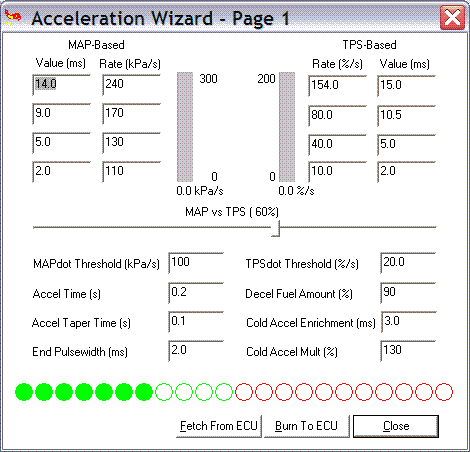
The manual shows the wizard with the following settings:
Image

The lowest box shows a rate of 110 kilopascals per second and the upper-most box is at 240. Now is this supposed to be how much of an increase in the MAP rate of change be within a given time frame? If we are running a normally aspirated engine then suffice it to say that these numbers will never be attained, correct?

Conversely, should'nt the loweset number in the "rate" box be somewhat higher that the number you have set as your threshold number to keep it from getting false triggers?

So, if my MAPDOT is swinging from, lets say, -18 to +23 then should'nt the threshold number be in the neighborhood of 25-30 and the lowest "rate" value be about 35?

Pleas explain :)

Thanx,
Bud

Posted: Sun Apr 16, 2006 11:46 am
by whittlebeast
Remember that the units are KPA/Sec and Percent/Sec. On the KPa side of the equation a motor needs a far amount of AE when the throttle is being moved to get in the ballpark of 60 KPA/Sec When looking at the TPS side of things, moving the throttle from near 0 throttle to full throttle in one sec would give 100%/sec roughly the equilivent of 60 KPA/sec. The threshold is the rate of change of either of these things that the code uses to ignore all action below this threshold. I have found that having a tapering AE seems more tunable than a fixed ms of AE. Most motors appeare to need the most AE at about 2500 RPM

Hope this helps

AW

Posted: Sun Apr 16, 2006 5:31 pm
by JSC
Hey Bud;

I had problems with the AE also. What was causing my problem was the TPS averaging lag factor, if it's set very high >50 it dampens the rate of increase of the TPS signal. I think mine is set about 30 now. If you bring up the Accel wizard and just turn the key on (don't start) push the throttle to the floor in 1 second you should see the bar graph on the left side of the TPS section go to 100%/sec, if not lower the TPS averaging lag factor in Settings, General. You don't want the factor too low but if it's too high, the TPS accel doesn't work.

Scott

Posted: Mon Apr 17, 2006 7:11 am
by 69 1/2 Six Pack Bee
Thanx for the explains, guys. And, BTW, Scott,
If you bring up the Accel wizard and just turn the key on (don't start) push the throttle to the floor in 1 second you should see the bar graph on the left side of the TPS section go to 100%/sec,...
My TPS tell-tale bar graph in the Accel Wizard will NOT go past about 25 regardless of what setting I change to where. I had posted this earlier in another thread but I never got any hits or explaination so I figure it was a moot point and must be "normal". I will probably not use the TPS AE anyway because I have a pretty large TBI and the TPS AE is a pain in the rump to ty and tune anyway.

I found out over the past weekend about the lag factors' effects on the tuning efforts. I was seeing a wide sweep of the MAPDOT when the engine was not running and I was watching a datalog. I saw that @ 50% the swing was pretty much sinusodal +2 to -2. So, I started to play with the TPS lagging factor I dropped the number down to 30 and it was smooth. Up to 40 also smooth. Up to 45 and still smooth so that is where I stopped. I have my EGO, however, set to 100 % because I know that the LC-1 even set at 1/12th/sec resolution is plenty fast and smooth and I want my tables monitored quickly and consistently.

Thanx for the heads up!

Bud