Page 2 of 2
Re: No communication with microsquirt
Posted: Tue Feb 10, 2009 7:04 am
by Matt Cramer
Could you try the Port Check program and post a screen shot?
Re: No communication with microsquirt
Posted: Tue Feb 10, 2009 11:09 am
by 24c
I am working away from home until Friday this week, so I will do then.
From what I remember, it says approx.
Com4
9600 etc
115200 etc
1 valid port found
hit return when done?
It doesn't say anything about the B&G embedded code anymore.
Re: No communication with microsquirt
Posted: Wed Feb 11, 2009 7:27 am
by Matt Cramer
I'd need the exact message.
Re: No communication with microsquirt
Posted: Thu Feb 12, 2009 3:27 pm
by 24c
OK
Matt, I'm back home now... screen shot for you.
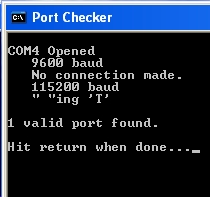
- port_checker_no_comms.jpg (21.08 KiB) Viewed 1387 times
BTW, it makes no difference if I am in program mode, bootload to ground or normal running at 5V. The message is the same.
FWIW, if you do not power the Microsquirt up line 5 in PortChecker reads
"∆"ing 'q'
edit...couldn't find the delta on the XP keyboard

Re: No communication with microsquirt
Posted: Fri Feb 13, 2009 7:31 am
by Matt Cramer
We may need to set up an RMA for this - email me at
websales@diyautotune.com.
Re: No communication with microsquirt
Posted: Fri Feb 13, 2009 8:56 am
by racingmini_mtl
If you do get something with no power to the Microsquirt I would suspect the USB-serial cable, if that's what you're using, or the computer serial port.
Jean
Re: No communication with microsquirt
Posted: Fri Feb 13, 2009 11:18 am
by 24c
@Jean
I didn't see Matt's post until I got back from the bucket PC shop. Armed with three new USB Serial adaptors, comprising one identical ATEN (Prolific chip..PL2303), a NewLink (Prolific chip, same as ATEN), and a generic 2xRS232 to USB (FTDI chip) and no comms with any.
This time using the new ATEN, in PortChecker I got "]"ing 'T' in line 5, whereas the others both said "No connection made" for line 5 and all said "1 valid port found." for line 6. On all bar the NewLink (which doesn't have any) I could see the LEDs flashing whilst PortChecker tried to communicate.
I also switched USB ports, COM3 or COM4 are the options on my MacBook using Windows.
The USB oscilloscope works on both ports
Re: No communication with microsquirt
Posted: Fri Feb 13, 2009 2:45 pm
by racingmini_mtl
The "No connection made" is what I would expect if you have your adapter connected to the PC and the Microsquirt is off. That's what I get with a Prolific-based and an FTDi-based adapter. And with power I get the expected response.
So I would not trust the ATEN adapter which gives you the strange response. But since you get no comms with any of the adapters then check with Matt to get the RMA because there's likely something wrong with your Microsquirt.
Jean
Re: No communication with microsquirt
Posted: Sun Feb 15, 2009 7:48 am
by Bruce Bowling
Send me an offline email at
bbowling@earthlink.net, I will help you directly with this to see what is going on with the communications.
- Bruce