Can not get MS to connect to laptop
Forum rules
Read the manual to see if your question is answered there before posting. If you have questions about MS1/Extra or MS2/Extra or other non-B&G code configuration or tuning, please post them at http://www.msextra.com The full forum rules are here: Forum Rules, be sure to read them all regularly.
Read the manual to see if your question is answered there before posting. If you have questions about MS1/Extra or MS2/Extra or other non-B&G code configuration or tuning, please post them at http://www.msextra.com The full forum rules are here: Forum Rules, be sure to read them all regularly.
-
isaacson06
- MegaSquirt Newbie
- Posts: 33
- Joined: Thu Nov 24, 2011 7:28 pm
Can not get MS to connect to laptop
ive read all the write ups i can find and tried every last thing they say and none of it works. This is how i have it setup as of now injectors have power and ground hooked up and so does tps and thats all i have wired as of now cuz my usb to serial came and i wanted to see if it worked so i stopped wiring and tried hooking the laptop up. ive tried megatune and tunerstudio to connect but nothing. ive tried to mess with the com ports settings some people say to slow them down helps ive also tried uninstalling drivers and reinstalling them with no luck. tried to do the update thing with msdownloader program and it cant even do that. If someone could help that would be great. thanks
-
Bernard Fife
- Super Squirter
- Posts: 1009
- Joined: Mon Feb 16, 2004 3:15 pm
Re: Can not get MS to connect to laptop
issac,
Telling us you 'tried every last thing' is essentially telling us nothing at all. If you don't have a serial connection, you won't be able to load code. Trying what 'some people said' isn't usually too helpful either. You need to read and understand the manual.
If this was mine, I would follow the steps here: http://www.useasydocs.com/details/connect.htm and then let us know explicitly what you find at each and every step.
Lance.
Telling us you 'tried every last thing' is essentially telling us nothing at all. If you don't have a serial connection, you won't be able to load code. Trying what 'some people said' isn't usually too helpful either. You need to read and understand the manual.
If this was mine, I would follow the steps here: http://www.useasydocs.com/details/connect.htm and then let us know explicitly what you find at each and every step.
Lance.
-
isaacson06
- MegaSquirt Newbie
- Posts: 33
- Joined: Thu Nov 24, 2011 7:28 pm
Re: Can not get MS to connect to laptop
I have tried everything on that page and nothing has changed it fails everytime. Also should I be using tuner studio or megatune ? Thanks again
-
24c
- Master Squirter
- Posts: 593
- Joined: Sat Feb 16, 2008 12:15 pm
- Location: Chorley, Lancashire UK
- Contact:
Re: Can not get MS to connect to laptop
I'd use TunerStudio, as Megatune is old hat, not dissing anybody here, so please don't take offence.
FWIW, I had comms issues with MicroSquirts over the last few years of dabbling, and normally a reinstall of the firmware sorted everything. I am using a Mac, so that brings its own problems, as I had to do Windows via Bootcamp or later using Parallels. Unless you have a very early version MicroSquirt, red PCB IIRC, you are probably at a fixable point, so don't fret help will probably appear.
Unfortunately yours is a very generic post and will need to throw more questions into the ring. Do you see any comms port activity? Have you tried serial comms with anything else. What error messages are you getting? and without being rude, you need to feed the guys with details, because generalisations aren't enough, but I do understand your frustration.
FWIW, I had comms issues with MicroSquirts over the last few years of dabbling, and normally a reinstall of the firmware sorted everything. I am using a Mac, so that brings its own problems, as I had to do Windows via Bootcamp or later using Parallels. Unless you have a very early version MicroSquirt, red PCB IIRC, you are probably at a fixable point, so don't fret help will probably appear.
Unfortunately yours is a very generic post and will need to throw more questions into the ring. Do you see any comms port activity? Have you tried serial comms with anything else. What error messages are you getting? and without being rude, you need to feed the guys with details, because generalisations aren't enough, but I do understand your frustration.
-
isaacson06
- MegaSquirt Newbie
- Posts: 33
- Joined: Thu Nov 24, 2011 7:28 pm
Re: Can not get MS to connect to laptop
Here's what I have done in a nut shell. I got the micro squirt and wired power with a relay to it and also wired grounds and then my USB-serial came in the mail and it came with a cd with drivers so I downloaded them onto the computer and plugged my converter in and went into devise manager and changed com ports to 11520 and that was it. Ran out side turned the bike on witch powers the ms and plugged the computer in and fired up megatune and went to settings and changed them to com 1 and went to test connection and it failed everytime with messing with different com ports and setting then I turned on tuner studio and did the same and have the same thing. Is there somthing you are suppost to do when you first get ms ? I'm I missing a step ?
-
isaacson06
- MegaSquirt Newbie
- Posts: 33
- Joined: Thu Nov 24, 2011 7:28 pm
Re: Can not get MS to connect to laptop
None of my computers have a serial port so i can not check the code loaded on the board if this was somthing missed at the factory would this make since of whats going on ? with not connecting ? thanks
-
isaacson06
- MegaSquirt Newbie
- Posts: 33
- Joined: Thu Nov 24, 2011 7:28 pm
Firmware mismatch
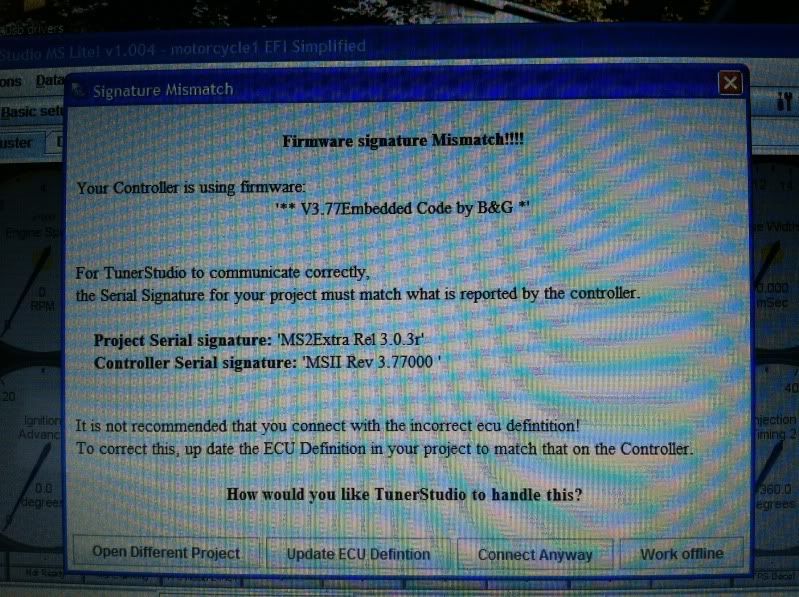
I have gotten my ms hooked up to my computer after fighting it for a week but now im getting this error ive search around but dont know what to do exactly and ive tried to pick differnet projects and it tells me that tunerstudio does not support this firmware so what do i need to do down grade?? to lower version? any input would be great thanks.
this is tunerstudio
this one is megatune
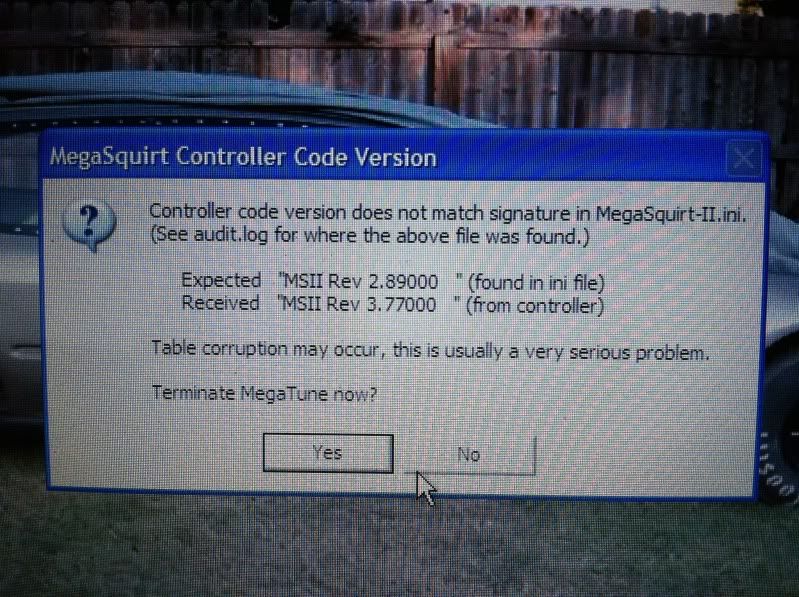
this is tunerstudio
this one is megatune
-
two stroker
- MegaSquirt Newbie
- Posts: 17
- Joined: Sun Nov 06, 2011 11:09 am
Re: Can not get MS to connect to laptop
Hello I had that problem when i tried to connect , you need the new 3.770 ini file for tuner studio, i found it somewhere in mega squirt II code revision . I did that and it connected .
found it its under www.megamanual.com/files/ini/ at the bottom.
found it its under www.megamanual.com/files/ini/ at the bottom.
-
24c
- Master Squirter
- Posts: 593
- Joined: Sat Feb 16, 2008 12:15 pm
- Location: Chorley, Lancashire UK
- Contact:
Re: Can not get MS to connect to laptop
+1 You click on the Update ECU Definition, and if TunerStudio is new enough, I'm using the beta version, it should find the ini like mine did.two stroker wrote:...you need the new 3.770 ini file for tuner studio...
PS I have had comms issues in the past and it was wear & tear with the MicroSquirt supplied jack plug to serial lead, which is why I bought a RS232 Serial LED diagnostic tester off fleaBay, and now I have a visual indicator too.
-
isaacson06
- MegaSquirt Newbie
- Posts: 33
- Joined: Thu Nov 24, 2011 7:28 pm
Re: Can not get MS to connect to laptop
Thank you so much i was getting ready mad at this lol but i wake up and you nice guys post the info i need and within 10 mins im running the software on the computer with no other problems at this time now ill wire up the bike tonight and see if i can get sensors feedback it should feed back on the main gauge page on tunerstudio right ?? thank you guys so much